

Prerequisites
- Cursor, VS Code, or VS Code with Claude Code installed (latest version recommended)
- Credible organization set up by an admin
- Database connections configured by your admin — see Connect a Database
What the Credible Extension Provides
The Credible Extension configures your IDE workspace with everything the agent needs for semantic modeling:- Modeling MCP tools — A set of MCP tools built specifically for modeling: the agent can discover tables in your warehouse, suggest modeling approaches, and look up Malloy syntax — the same open tools Malloy Publisher provides
- Modeling skills — Slash commands (e.g.,
/malloy-model,/malloy-discover,/credible-publish) that guide the agent through common workflows. These are Credible’s open-source skills — the same playbooks the in-app agent runs. The agent uses them automatically based on context - Managed database connections — Access connections configured in the Credible App without storing credentials locally
- Credible Service Panel — Browse your environment and its managed connections, down to individual schemas and tables
- Syntax highlighting & compilation checks for
.malloy,.malloynb, and.malloysqlfiles - Schema | Explore | Preview buttons above any source definition
- Run | Show SQL buttons above any query or run statement
Installation
Install the Credible Extension & Sign In
- In Cursor or VS Code, go to the Extensions view (
Cmd+Shift+Xon Mac,Ctrl+Shift+Xon Windows/Linux), search for Credible, and install the extension — select Auto Update when prompted - Open the Explorer (
Cmd+Shift+Eon Mac,Ctrl+Shift+Eon Windows/Linux), expand the Credible panel at the bottom of the sidebar, and click Sign In — then follow the steps in your browser - Back in your IDE, select your organization from the list (if you only belong to one, it’s selected automatically), then select your environment
Modeling MCP Tools
The Credible Extension equips your agent with a set of MCP tools specifically for modeling — the same open tools Malloy Publisher provides, paired with the same open-source skills that guide every Credible agent. The extension registers them automatically as an environment-scoped Credible-Modeling MCP server — no manual enabling required. In Cursor, the extension registers the server programmatically; in VS Code, it writes a workspace-scoped.vscode/mcp.json config.
- Cursor
- VS Code
- Claude Code
To verify, open Cursor Settings (
Cmd+Shift+J on Mac, Ctrl+Shift+J on Windows/Linux) → Tools & MCP. The server appears as extension-Credible-Modeling — Cursor uses this naming convention to indicate it was registered by an extension.Cmd+Shift+P → “Reload Window”).
Credible Service Panel
The Credible Service Panel shows your current environment and its connections. Find it at the bottom of the Explorer view (Cmd+Shift+E on Mac, Ctrl+Shift+E on Windows/Linux):
The Credible Service Panel is part of the IDE extension, so it’s available in Cursor and VS Code only. If you use Claude Code from the terminal, manage your environment with the CLI or the Credible App instead.
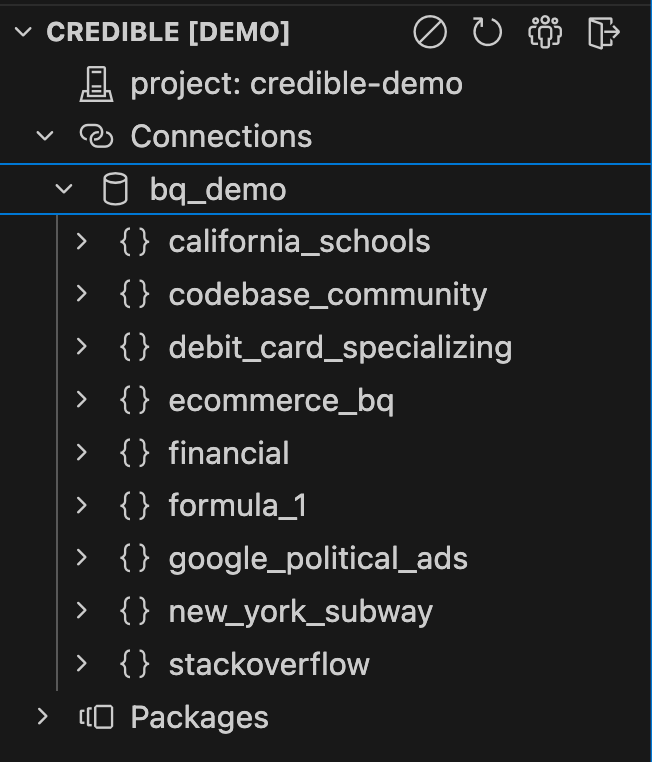
- Your current environment — click it to switch environments
- Connections: Managed database connections in the environment — expand one to browse its schemas and tables
Don't see the Credible Service panel?
Don't see the Credible Service panel?
The sidebar may be hidden by default in Cursor:
- Open the Explorer panel (
Cmd+Shift+E) (orCtrl+Shift+Eon Windows/Linux) - Look for the Credible panel at the bottom of the explorer sidebar
Panel controls
Panel controls
The Credible Extension can be configured via the Command Palette (
Cmd+Shift+P) or clicking icons in the Credible Service panel:- Disable Credible: Turn off the extension for this workspace
- Refresh: Reload your environment and its connections
- Select Organization: Choose from your available organizations (auto-selects if you only belong to one)
- Sign Out: Log out of Credible
Next Steps
Modeling Overview
Your environment is ready — start building semantic models with your agent
Connect your Coding Agent
Let your agent analyze data with your published models